Behind the scenes of modern AI event photo sharing: upload, processing, face indexing, QR access, personalized galleries, delivery, and analytics — from click to client.
Introduction: From Click to Client
For an event photographer, taking the photograph is only the beginning.
Once the camera stops shooting, another workflow begins: uploading thousands of images, organizing them, creating a gallery, sharing access with guests, helping people find their photographs, managing downloads, and delivering the final collection to the client.
Traditionally, much of this process has been manual. Photographers upload folders, create a gallery, copy a link, send it to the client, and ask guests to search through hundreds or thousands of photographs.
Modern event photo sharing platforms are changing that workflow. By combining cloud storage, image processing, AI-powered photo discovery, QR code access, personalized galleries, automated communication, and analytics, these platforms can turn a large collection of event photographs into a more accessible digital experience.
But what actually happens after the shutter is pressed? Let's go behind the scenes.
What Is an Event Photo Sharing Platform?
An event photo sharing platform is software designed to help photographers upload, organize, deliver, and share photographs from events with clients and guests.
Unlike a basic cloud-storage service, an event-focused platform can connect several parts of the photography workflow:
Photo Capture → Upload → Processing → AI Indexing → Guest Access → Photo Discovery → Gallery → Delivery → Analytics
The exact features vary between platforms, but the goal is the same: make it easier for photographers to deliver event photographs and easier for guests to find the images they care about.
This is especially useful for:
- Weddings
- Corporate events
- Conferences
- Festivals
- College events
- Sports events
- Parties
- Award ceremonies
- Brand activations
- Large social gatherings
The Complete Event Photo Sharing Workflow
A modern event photo-sharing workflow can be divided into seven major stages:
- Photo upload and processing
- AI-powered image indexing
- QR code event access
- AI face recognition and photo matching
- Personalized photo galleries
- Automated photo delivery
- Analytics and client insights
Let's look at each stage.
Step 1: Uploading and Processing Event Photos
Everything starts with the photographer's images. After an event, photographers may have hundreds or thousands of photographs that need to be transferred to a digital platform.
A modern platform needs to handle more than simple file storage. It needs to make those photographs available for online viewing while maintaining an efficient workflow for photographers.
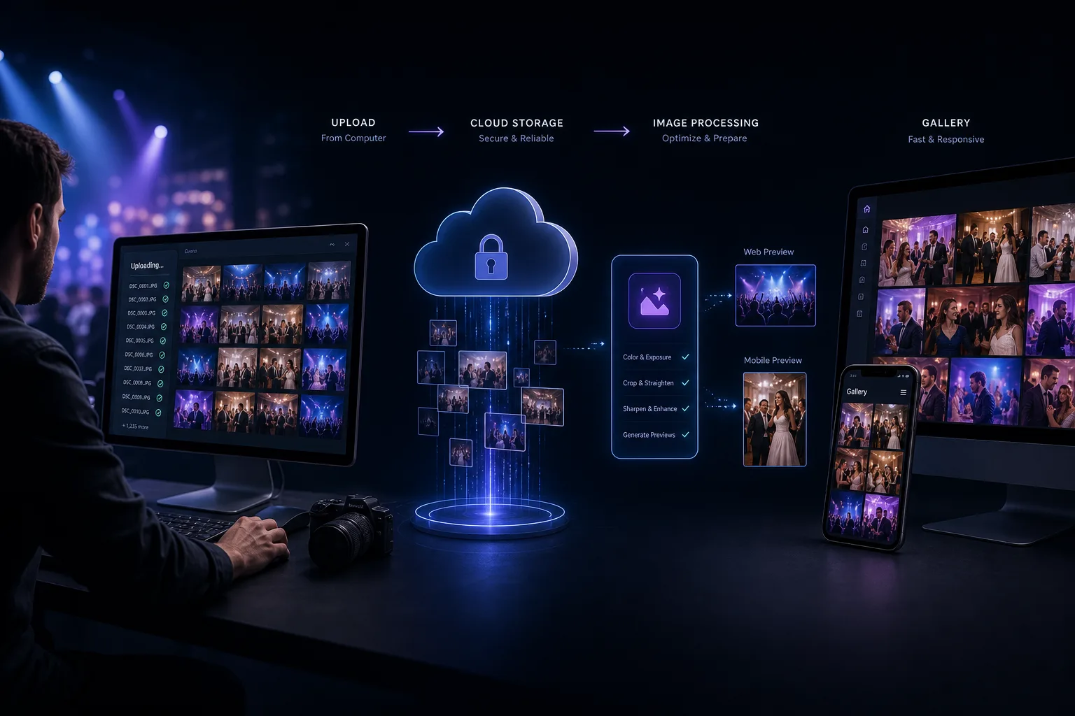 Upload → Cloud Storage → Image Processing → Gallery.
Original Files and Online Viewing
Professional photographs are often captured at high resolutions. Those original files are valuable for:
- Client delivery
- Printing
- Albums
- Commercial use
- Long-term storage
- Future editing
At the same time, displaying extremely large original files directly to every guest can create an unnecessarily slow browsing experience.
Therefore, modern image platforms may create optimized versions for web and mobile viewing while maintaining access to the original assets according to the platform's storage and delivery architecture.
This creates two important objectives:
- Preserve image quality for professional use.
- Optimize image delivery for everyday browsing.
Why Mobile Optimization Matters
Guests rarely access event galleries only from desktop computers. They may open photographs from:
- Smartphones
- Tablets
- Mobile networks
- Event Wi-Fi
- Social media links
- QR codes
A well-designed event photo gallery therefore needs to prioritize responsive design and efficient image loading.
Step 2: AI-Powered Photo Indexing
After photographs are uploaded, AI can help analyze the image collection. This is where an AI-powered event photo-sharing platform becomes different from a traditional folder or generic cloud drive.
Instead of treating photographs as anonymous files, an AI system can analyze visual information inside those photographs.
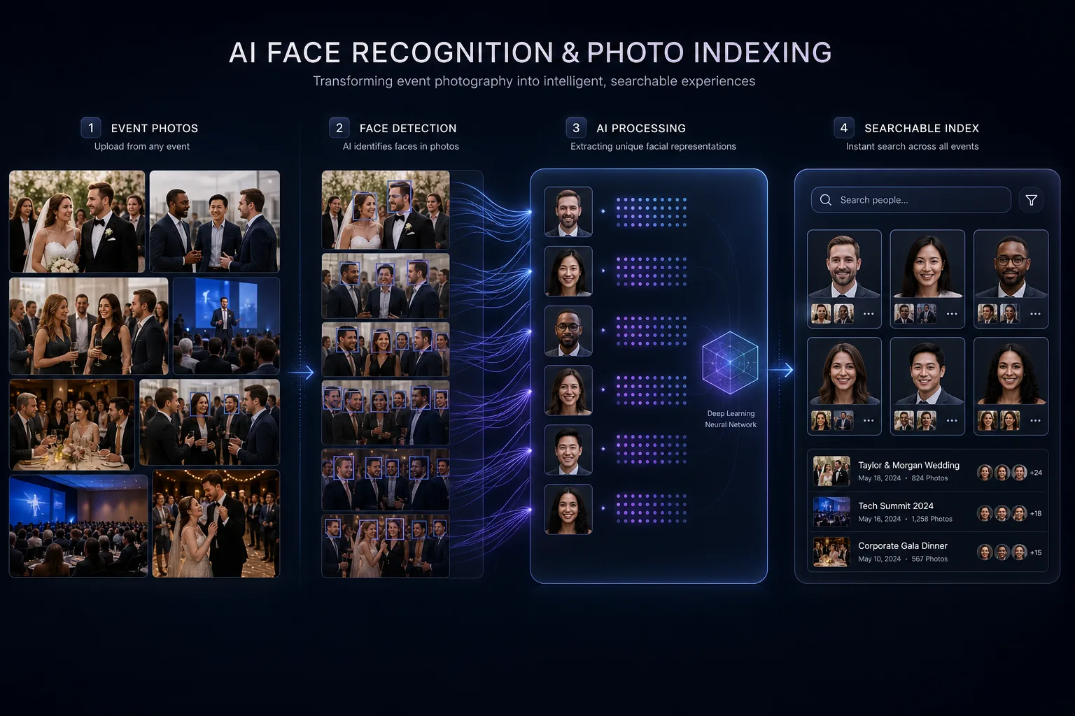 Event Photos → Face Detection → AI Processing → Searchable Index.
Face Detection
The first stage is face detection. The system can identify faces appearing in event photographs, including faces in:
- Portraits
- Group photographs
- Candid moments
- Wedding ceremonies
- Corporate events
- Parties
- Conferences
- Stage photographs
The detected information can then be indexed so it can be searched later.
Facial Embeddings
Some facial-recognition systems use facial embeddings to represent visual characteristics of a detected face as numerical data. This allows the system to compare facial representations without relying on traditional filename or folder-based searches.
The important concept for photographers is simple: the AI creates a searchable representation of faces within the event's photographs. When a guest later provides a selfie, the system can compare the new facial representation with the indexed event data.
This is what makes selfie-based photo discovery possible.
Step 3: QR Code Photo Sharing
The next challenge is access. Even the best photo-sharing technology is not useful if guests cannot easily find the event gallery. This is where QR code photo sharing becomes valuable.
A photographer can provide an event-specific QR code that guests scan with their smartphone.
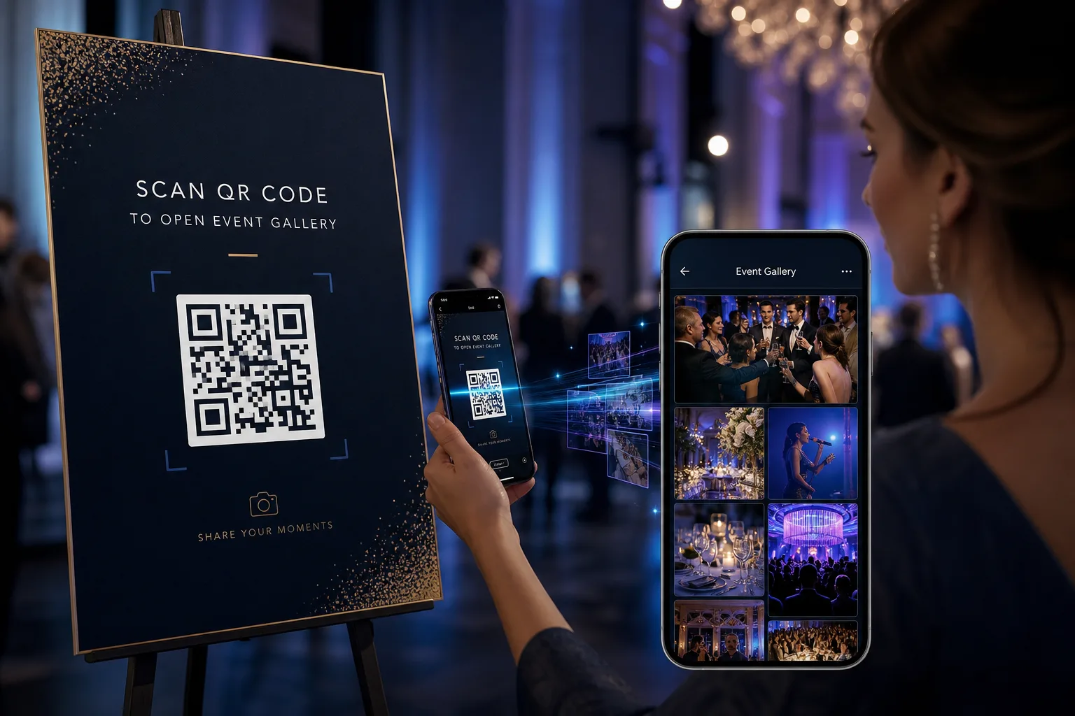 Scan QR Code → Open Event Gallery.
QR codes can be displayed on:
- Event signage
- Reception desks
- Tables
- Screens
- Invitations
- Photo booths
- Welcome boards
- Printed cards
Why QR Codes Work Well at Events
QR codes remove several unnecessary steps. Instead of:
Remember URL → Open browser → Type URL → Find event → Enter gallery
the experience becomes:
Scan → Open Event Gallery
This is particularly useful at fast-moving events where guests are unlikely to stop and follow complicated instructions.
Step 4: AI Face Recognition and Photo Matching
Now comes one of the most useful parts of an AI photo-sharing workflow. Imagine attending a wedding with thousands of photographs. You know photographs of yourself exist somewhere in the gallery. But manually finding them could take a long time.
AI face recognition changes the discovery process.
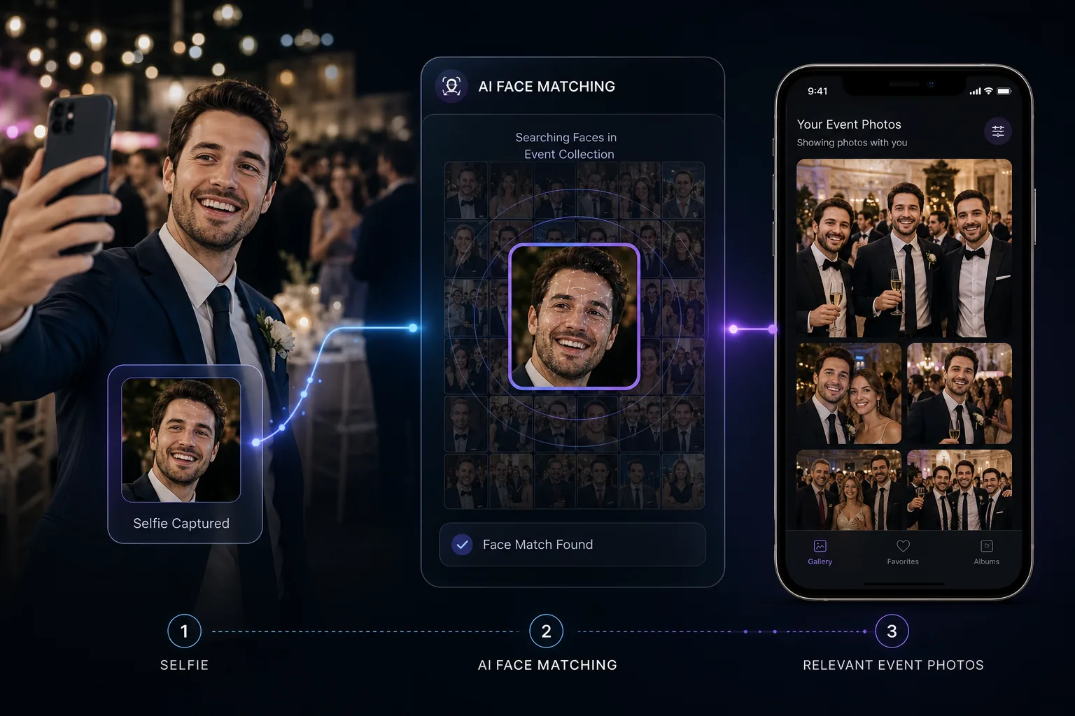 Selfie → AI Face Matching → Relevant Event Photos.
The Selfie Search Workflow
A typical workflow can look like this:
- The guest takes a selfie — The guest provides a selfie through the gallery interface.
- The system detects the face — The AI identifies the face in the selfie.
- The system creates a searchable representation — The facial characteristics are represented in a format that can be compared with indexed event photographs.
- The system searches the event collection — The platform compares the guest's facial representation with the indexed faces associated with event photographs.
- Matching photographs are returned — The guest receives photographs that the system identifies as potential matches.
This turns photo discovery from a manual browsing task into an AI-assisted search experience.
Why AI Photo Discovery Matters
Traditional galleries are usually organized around the photographer's workflow. The photographer thinks: "Here are all the event photographs." The guest thinks: "Where are my photographs?"
An AI photo-sharing platform attempts to bridge that gap. Instead of requiring every guest to browse the entire collection, the platform can help them discover photographs relevant to them.
This can be particularly useful for large events where a single gallery may contain thousands of images.
Step 5: Personalized Event Photo Galleries
Once relevant photographs are identified, the next stage is presentation. Instead of forcing a guest to browse the entire event collection, the platform can provide a more personalized viewing experience.
This is the concept behind an AI photo gallery.
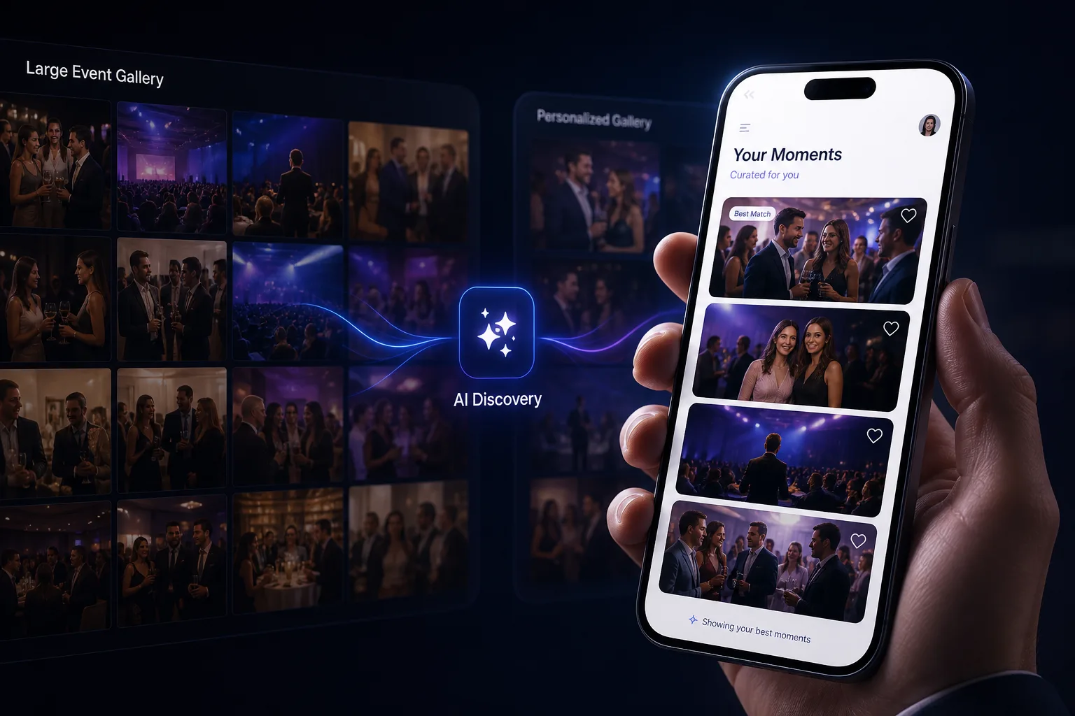 Large Event Gallery → AI Discovery → Personalized Gallery.
A personalized gallery can help guests:
- Find relevant photographs
- Browse their event moments
- Favorite photographs
- Download images
- Share photographs
- Return to the gallery later
From One Large Gallery to Personalized Discovery
The traditional approach is: One event → One large gallery → Everyone searches manually
A more personalized approach is: One event → AI discovery → Relevant photographs for each guest
The underlying event collection remains the same, but the way guests interact with it becomes more personalized.
Step 6: Automated Photo Delivery
Finding photographs is only part of the experience. Photographers also need a reliable way to tell guests when their images are ready. Modern event photo-sharing systems can support automated communication depending on the platform and configuration.
Possible communication channels can include:
- In-platform notifications
- Event-specific links
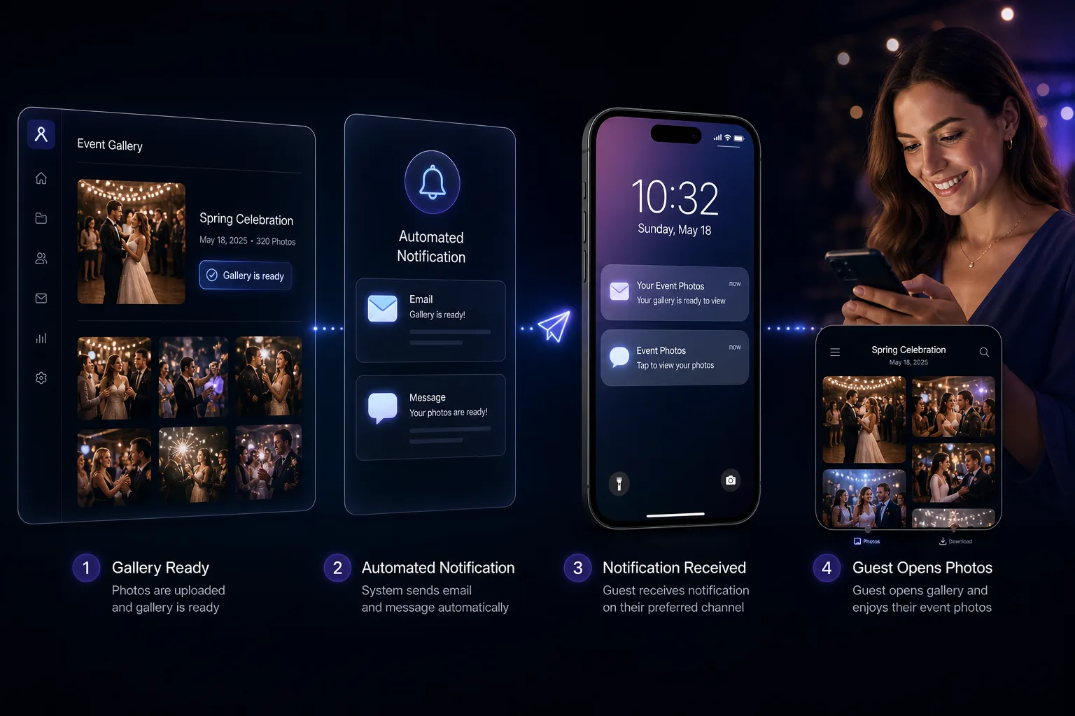 Gallery Ready → Automated Notification → Guest Opens Photos.
Why Automation Helps Photographers
Imagine a photographer has to manually message hundreds of guests after every event. That quickly becomes repetitive. Automation can reduce this administrative workload.
Instead of manually sending every message, the platform can trigger communication based on configured delivery workflows. For example:
Gallery Ready → Notification → Guest Opens Gallery → Guest Finds Photos → Guest Downloads or Shares
This creates a smoother journey from image delivery to guest engagement.
Step 7: Analytics and Event Insights
The workflow does not necessarily end when the gallery is published. Analytics can provide insight into what happens afterward.
Depending on the platform, photographers may be able to monitor information such as:
- Gallery visits
- Photo views
- Downloads
- Guest activity
- Registration activity
- Event engagement
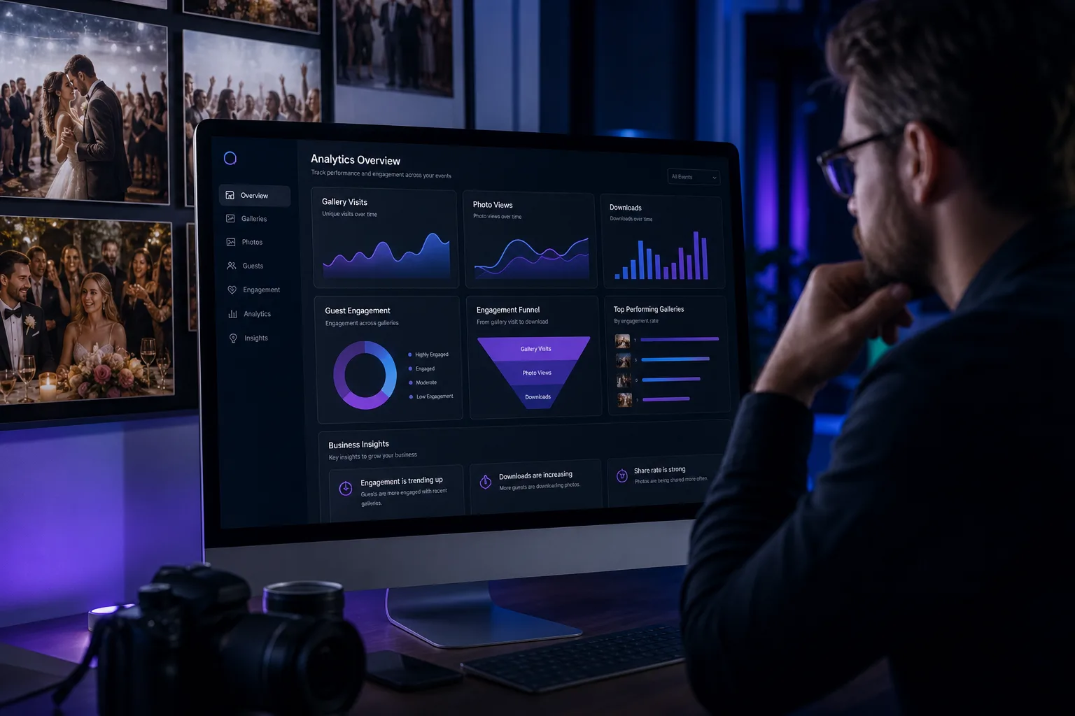 Photo Gallery → Guest Engagement → Analytics → Business Insights.
Why Analytics Matter
Without analytics, photographers may know that they delivered a gallery but have little visibility into what happened next. With analytics, they can better understand how clients and guests interact with their work.
For example, analytics can help answer questions such as:
- Did guests access the gallery?
- Are people downloading photographs?
- Which events receive the most engagement?
- How actively are guests interacting with the gallery?
- How can the delivery experience be improved?
For corporate and branded events, this information can also contribute to post-event reporting. See Cam-Shot event analytics for how engagement data can support that workflow.
What Happens Behind the Scenes?
From a technical perspective, an AI event photo-sharing platform can involve several connected systems. A simplified architecture looks like this:
Upload → Cloud Storage → Image Processing → AI Analysis → Face Detection / Indexing → Search Infrastructure → Guest Selfie → Face Matching → Personalized Gallery → Notifications → Analytics
The guest sees a simple interface. Behind that interface, multiple services may be working together.
Privacy and Security in AI Photo Sharing
AI face recognition introduces an important consideration: privacy. Photographers should understand how the platform handles photographs, guest information, and facial data before using AI-powered photo discovery at an event.
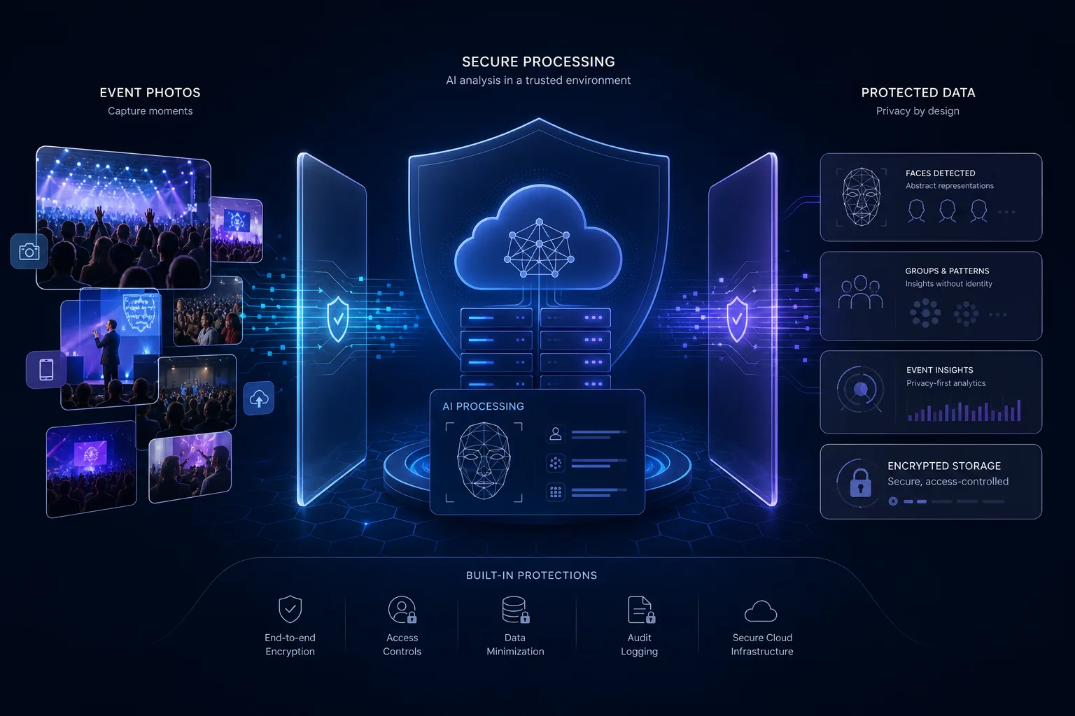 Event Photos → Secure Processing → Protected Data.
Questions to Ask Your Platform Provider
Before choosing a solution, ask:
- What data is collected?
- How is facial information processed?
- Where is event data stored?
- How is data protected?
- How long is information retained?
- Can event data be deleted?
- Who can access the data?
- What privacy controls are available?
- What compliance standards does the platform support?
Event Photo Sharing Platform vs Generic Cloud Storage
A generic cloud-storage service is useful for storing and sharing files. But event photography has different requirements.
The important difference is not simply storage. It is workflow specialization. A photographer isn't only storing files — they are delivering an experience. (For a deeper comparison, see Google Drive vs event photography software.)
How Cam-Shot Fits Into This Workflow
Cam-Shot AI is built around event photography and photo sharing. Its workflow connects several stages of the event photo-delivery process, including event galleries, AI-powered photo discovery, QR-based access, and other event-focused capabilities.
Photographers can use an event-focused platform to reduce the number of disconnected tools required between capturing photographs and delivering them to guests and clients.
For example, the workflow can be thought of as:
Create Event → Upload Photos → AI Processing → Guest Access → Photo Discovery → Gallery → Delivery
Cam-Shot also provides dedicated functionality such as AI Gallery and Photo Selection. The objective is to make event photo delivery part of the photography workflow rather than treating it as a separate task at the end.
How to Choose the Right Event Photo Sharing Platform
Not every platform will be suitable for every photographer. Before choosing one, evaluate the complete workflow.
1. Upload Experience
Can you upload large event collections reliably?
2. AI Capabilities
Does the platform provide the AI features you actually need? For example:
- Face recognition
- Photo discovery
- AI galleries
- AI highlights
- Photo organization
3. Guest Experience
Can guests quickly access and navigate the gallery from their phones?
4. QR Code Sharing
Can you create event-specific QR codes and place them around the venue?
5. Branding
Does the platform support your photography brand? Look for custom branding, white-label capabilities, custom domains, and branded galleries.
6. Image Quality
Understand how the platform handles original files, preview images, downloads, compression, and storage.
7. Privacy and Security
Understand how guest and facial data is handled.
8. Analytics
Check whether the platform provides useful information about gallery engagement.
9. Client Collaboration
If your workflow involves client selections, favorites, or approvals, check whether those capabilities are built into the platform.
For a wider market view, see our roundup of the best event photography software in 2026.
Best Practices for Photographers
Technology works best when combined with a well-planned event workflow.
Before the Event
Prepare event details, branding, gallery configuration, QR codes, guest instructions, and privacy requirements.
During the Event
Make the gallery easy to discover. Place QR codes in visible locations and explain to guests how they can access their photographs.
After Upload
Follow a simple process: Upload → Process → Review → Test → Publish → Notify
Always test the guest experience before sharing the gallery widely.
After Delivery
Review analytics and client feedback. Look for opportunities to improve guest access, gallery organization, photo delivery, communication, branding, and overall client experience.
The Future of Event Photo Sharing
The future of event photography is not only about capturing better photographs. It is also about making those photographs easier to discover.
As AI becomes more integrated into photography workflows, event platforms can increasingly automate repetitive processes while giving guests more personalized ways to interact with photographs.
The workflow is evolving from:
Capture → Upload → Send Link
toward:
Capture → Upload → AI Processing → Discover → Personalize → Deliver → Measure
That change represents a broader shift in event photography. The photographer is no longer responsible only for creating images. They are also creating a digital experience around those images.
Conclusion: From Click to Client
Event photography does not end when the photograph is captured. The real workflow continues through upload, organization, discovery, delivery, and engagement.
Modern event photo sharing platforms connect these stages into a single digital experience. The simplified workflow is:
Capture → Upload → AI Processing → Photo Indexing → QR Access → AI Photo Discovery → Personalized Gallery → Photo Delivery → Analytics
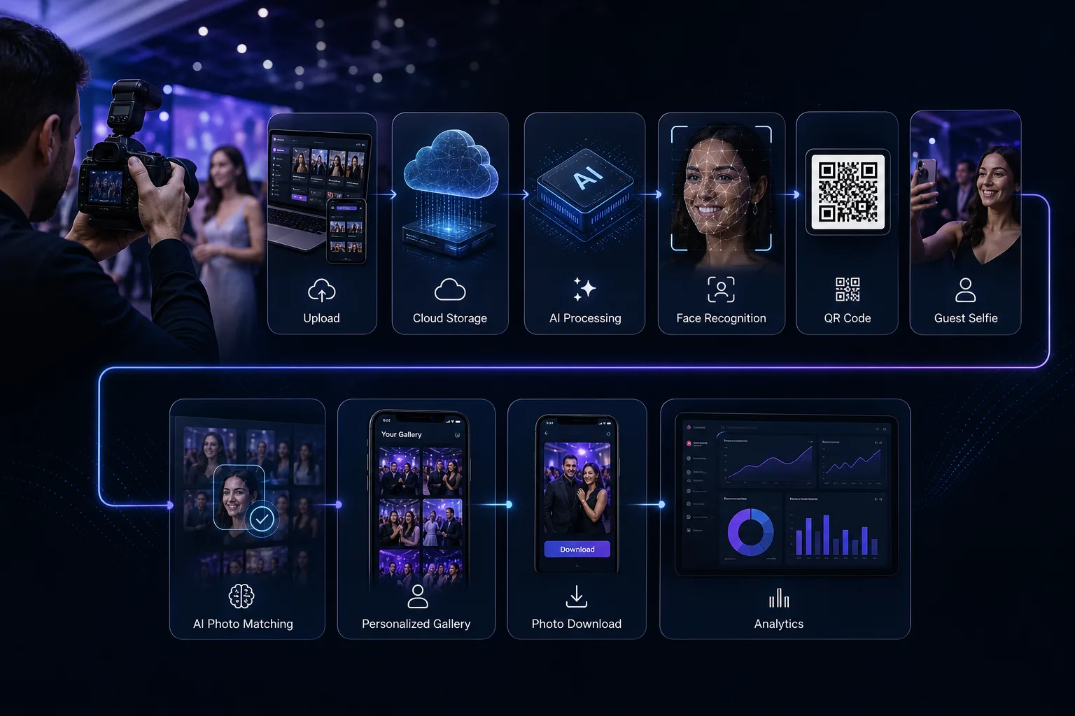 The full path from shutter click to client delivery.
For photographers, this can mean less repetitive administration and a more streamlined delivery process. For guests, it means an easier way to find and access the moments they are part of. And for clients, it creates a more professional experience around the photographs they have invested in.
The future of event photography is therefore not simply about taking the perfect shot. It is about what happens from click to client.
Ready to Modernize Your Event Photo Sharing?
Move beyond folders and generic file links. Explore how an event-focused platform can help you create a faster, more personalized photo-sharing experience for your guests and clients.
Explore More:
Event Photo Sharing · Explore AI Gallery · Explore All Features
Prefer mobile? Download on Google Play or get the iOS app.